




NVMe vs M.2: Understanding the Real Difference in Speed, Slots & Use-Cases
Introduction
Storage technology has evolved rapidly—from bulky hard drives to lightning-fast PCIe-based SSDs. Today, the two terms that confuse most buyers are:
-
M.2 SSD
-
NVMe SSD
At Supreme Computers (Chennai’s trusted IT & laptop upgrade store), we hear questions like:
⭐ “Is NVMe the same as M.2?”
⭐ “My laptop has an M.2 slot—can I install NVMe?”
⭐ “Why is one SSD cheaper than the other even though both are M.2 size?”
This confusion is completely normal because NVMe and M.2 often appear together but represent different layers of the technology.
This detailed guide explains everything clearly.
What Exactly Is M.2? — Form Factor, Not Speed
Many people mistake M.2 as a type of SSD performance standard.
But in reality:
👉 M.2 is just the connector + physical size of the SSD.
It does NOT determine the speed.
Key Characteristics of M.2 SSDs
-
Used for SSDs, Wi-Fi cards, WWAN modules.
-
Supports multiple interfaces, such as:
-
SATA (slow)
-
PCIe NVMe (fast)
-
-
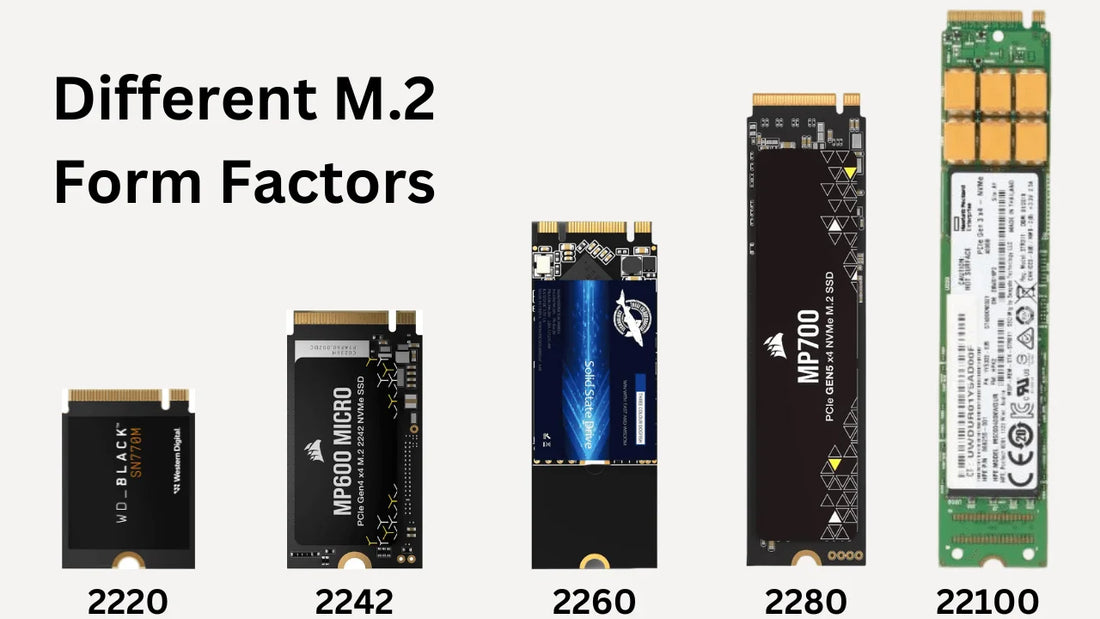
Comes in different lengths:
-
2242, 2260, 2280 (most common), and 22110
-
Example: 2280 = 22mm width, 80mm length
-
Types of M.2 SSDs
-
-
Uses SATA interface
-
Limited to ~550 MB/s
-
Good for older laptops
-
-
-
Uses PCIe lanes
-
Extremely fast
-
Ideal for modern systems
-
So, M.2 is the body, but speed depends on whether the SSD is SATA or NVMe.
What Is NVMe? — A High-Speed PCIe Communication Protocol
NVMe stands for Non-Volatile Memory Express.
It is not a shape, not a size, and not a connector.
NVMe is a protocol that uses PCIe lanes to access SSD storage with extremely low latency and high parallelism.
Why NVMe Is So Fast
-
Direct communication to CPU
-
Multiple queues (up to 64K)
-
Handles thousands of simultaneous operations
-
Eliminates SATA bottleneck
PCIe Generation Speeds
|
PCIe Version |
Speed (Per Lane) |
NVMe x4 Theoretical Speed |
|
PCIe 3.0 |
1 GB/s |
Up to 4 GB/s |
|
PCIe 4.0 |
2 GB/s |
Up to 8 GB/s |
|
PCIe 5.0 |
4 GB/s |
Up to 15 GB/s |
This is why modern NVMe SSDs are used in AI workloads, GPU-based systems, and high-performance computing.
⭐ The REAL Difference: NVMe vs M.2 Breakdown
1. NVMe = Speed Protocol
M.2 = Physical Slot Type
This is the simplest way to understand it:
-
M.2 → where SSD plugs in
-
NVMe → how the SSD communicates
So you can have:
✓ M.2 SATA SSD (slow)
✓ M.2 NVMe SSD (fast)
But you cannot have an NVMe SATA SSD because NVMe uses PCIe, not SATA.
2. Speed Difference (Most Important)
M.2 SATA SSD Speed
-
450–550 MB/s
-
Similar to normal 2.5” SSDs
-
Works even on older platforms
NVMe SSD Speed
-
Gen 3: 3,000–3,500 MB/s
-
Gen 4: 5,000–7,500 MB/s
-
Gen 5: 10,000–14,000 MB/s
👉 NVMe is up to 20x faster than M.2 SATA.
This directly affects:
-
Boot time
-
Level loading
-
Exporting videos
-
File moving
-
Previewing large images
-
Game asset streaming
3. Compatibility Difference (Very Important in Upgrades)
Not every M.2 slot supports NVMe.
Three Types of M.2 Slots
-
SATA-only M.2 slot → Supports only SATA SSD
-
PCIe-only M.2 slot → Supports only NVMe SSD
-
Hybrid slot → Supports both SATA & NVMe
How to identify?
-
Check BIOS storage interface
-
Check motherboard/laptop manual
-
Look for M-key / B-key notch
M.2 Keying Explained
|
Key Type |
Supports |
Typical Use |
|
B-Key |
SATA + PCIe x2 |
Budget NVMe or SATA SSD |
|
M-Key |
PCIe x4 full speed |
High-speed NVMe SSD |
|
B+M Key |
SATA + PCIe x2 |
Universal compatibility |
At Supreme Computers Chennai, we verify this before recommending upgrades.
4. Performance in Real-World Tasks
NVMe SSD Boosts:
✔ Ultra-fast Windows booting
✔ 4K/8K video editing
✔ Unreal/Unity game development
✔ Faster loading of games like COD, Valorant, GTA V
✔ Virtual machines & servers
✔ AI-based software workloads
M.2 SATA SSD Boosts:
✔ Faster boot than HDD
✔ Smoother office work
✔ Good for daily users
✔ Best for older laptops
5. Use-Cases: Which One Should YOU Choose?
Choose NVMe If You Are:
-
a gamer
-
a professional creator
-
a programmer or software developer
-
a business user needing high-speed operations
-
upgrading a modern laptop or PC
-
want future-proof performance
Choose M.2 SATA If You Are:
-
upgrading an older laptop with SATA-only slot
-
doing basic tasks (Office, browsing, YouTube)
-
looking for the most affordable SSD upgrade
-
need reliability over raw speed
Expanded Comparison Table
|
Feature |
NVMe SSD |
M.2 SATA SSD |
|
Interface |
PCIe |
SATA |
|
Max Speed |
3500–14000 MB/s |
550 MB/s |
|
Boot Time |
2–5 seconds |
8–12 seconds |
|
Performance Impact |
Extremely high |
Moderate |
|
Heat Generation |
Higher |
Lower |
|
Power Efficiency |
Better under load |
Better idle |
|
Ideal Devices |
Modern laptops/PCs |
Older M.2 laptops |
|
Price |
Slightly higher |
Budget-friendly |
Supreme Computers – Expert Recommendation
As Chennai’s trusted IT retailer & service provider, we recommend:
-
NVMe Gen 4 SSD – Best balance of speed & price
-
NVMe Gen 5 SSD – For high-end creators, AI, pro gamers
-
M.2 SATA SSD – Only if laptop doesn't support NVMe
We also provide:
✔ System compatibility check
✔ SSD installation
✔ Data migration / cloning
✔ Windows activation setup
✔ Performance tuning
WHO CAN USE NVMe & M.2 SSDs? (User Profiles & Ideal Scenarios)
Upgrading to the right SSD depends on how you use your laptop or PC. Here’s a clear breakdown:
1. Students & Office Professionals
Ideal SSD: M.2 SATA or NVMe Gen 3
Why: Faster boot, quick app launching, smoother multitasking.
Perfect for:
-
MS Office
-
Online classes
-
Browsing, research
-
Email & productivity tasks
2. Content Creators (Photo, Video, 3D, Design)
Ideal SSD: NVMe Gen 4 or Gen 5
Why:
-
Faster render speeds
-
Quick file transfers
-
Smooth 4K/8K video editing
-
Large project handling in Adobe, DaVinci, Blender
Creators benefit most from NVMe speeds in day-to-day workflow.
3. Gamers (Casual & Pro)
Ideal SSD: NVMe Gen 3/4
Why:
-
Games load instantly
-
Reduces stutters & texture pop-ins
-
Better experience in titles like Valorant, COD, Fortnite, GTA V, Cyberpunk
Gamers feel an immediate difference.
4. Programmers & Software Developers
Ideal SSD: NVMe Gen 3/4
Why:
-
Faster code compilation
-
Better performance with Docker, VMs, WSL
-
Quick indexing in VS Code, Android Studio
5. Businesses, Small Offices & Corporate Users
Ideal SSD: NVMe Gen 4
Why:
-
Reduces downtime
-
Faster boot → higher productivity
-
Smooth multitasking across ERP, accounting software, CRM
6. AI/ML Practitioners, Data Analysts, Engineers
Ideal SSD: NVMe Gen 4/5
Why:
-
Handles large datasets
-
AI model file loading
-
High IOPS workloads
-
Rapid caching
7. Older Laptop Users
Ideal SSD: M.2 SATA
Why:
-
Maximum compatibility
-
Huge speed jump from HDD
-
Affordable upgrade
⭐ WHY SUPREME COMPUTERS CHENNAI IS THE BEST PLACE FOR SSD UPGRADES
Supreme Computers is one of Tamil Nadu’s most trusted IT retailers & upgrade specialists with 31+ years of expertise. Customers choose us because we provide end-to-end upgrade support, not just hardware.
1. Expert Compatibility Check
We ensure your laptop or PC supports the right SSD (NVMe / SATA / PCIe generation) before installation—avoiding mismatch issues.
2. Genuine Products With Warranty
We offer SSDs from trusted brands:
-
Samsung
-
Crucial
-
Western Digital
-
Kingston
-
Adata
-
Seagate
Every unit comes with manufacturer warranty + our service support.
3. Professional Installation & OS Migration
Our technicians handle:
-
SSD installation
-
Data cloning without loss
-
Windows installation & activation
-
Driver setup
-
Thermal optimization
4. Best Pricing in Chennai
We provide competitive pricing for both retail and bulk corporate orders.
5. After-Sales Support
Free troubleshooting & performance tuning after the upgrade.
CONCLUSION
Choosing between NVMe and M.2 SSD becomes easy once you understand their core difference:
-
M.2 is only the slot/form factor.
-
NVMe is the high-speed PCIe protocol that delivers next-level performance.
If you want maximum speed, including faster booting, quicker app loading, smoother video editing, rapid file transfers, and enhanced gaming responsiveness, NVMe SSDs are the best upgrade for 2025—especially for users in Chennai and Tamil Nadu who depend on high-performance laptops and PCs for work, study, and gaming.
For older laptops that support only SATA, an M.2 SATA SSD still provides a dramatic improvement over HDDs and remains a cost-effective upgrade across Tamil Nadu.
At Supreme Computers Chennai, the trusted SSD dealer in Chennai, we ensure every customer gets:
✔ Accurate compatibility check
✔ Fast & professional SSD installation
✔ 100% genuine NVMe & M.2 SSDs
✔ Best pricing in Chennai
✔ Reliable after-sales support
Whether you're a student, gamer, content creator, software developer, or business owner in Tamil Nadu, choosing the right SSD upgrade can instantly transform your system’s performance and productivity. For expert guidance and the best SSD deals, Supreme Computers remains Chennai’s most trusted choice.
For More details Contact us:
Website: www.supremeindia.com
Email: esupport@supremeindia.com
Call / WhatsApp: 7305844492 / 9500017188

